Understanding the dashboard
A guide to the main dashboard, including the getting started checklist, activity stats, recent posts, upcoming schedule, quick actions, and compliance alerts.
The getting started checklist
When you first set up your business, the dashboard shows a getting started checklist that tracks five key onboarding steps. Each step links directly to the relevant page:
- Complete your business profile - opens Business Settings where you can refine your brand, voice, and topics.
- Connect a social account - takes you to Social Accounts to link Facebook, Instagram, LinkedIn, X, or Google Business Profile.
- Add media to your library - opens the Media Library tab where you can upload images or browse stock photos.
- Create your first post - takes you to the content generation page.
- Schedule or publish a post - takes you to the queue to confirm a post is scheduled.
The checklist shows your progress with a progress bar (for example, "3 of 5 complete"). Once all five steps are done - or if you dismiss the checklist by clicking the X - the dashboard switches to the full activity view.
Activity stats
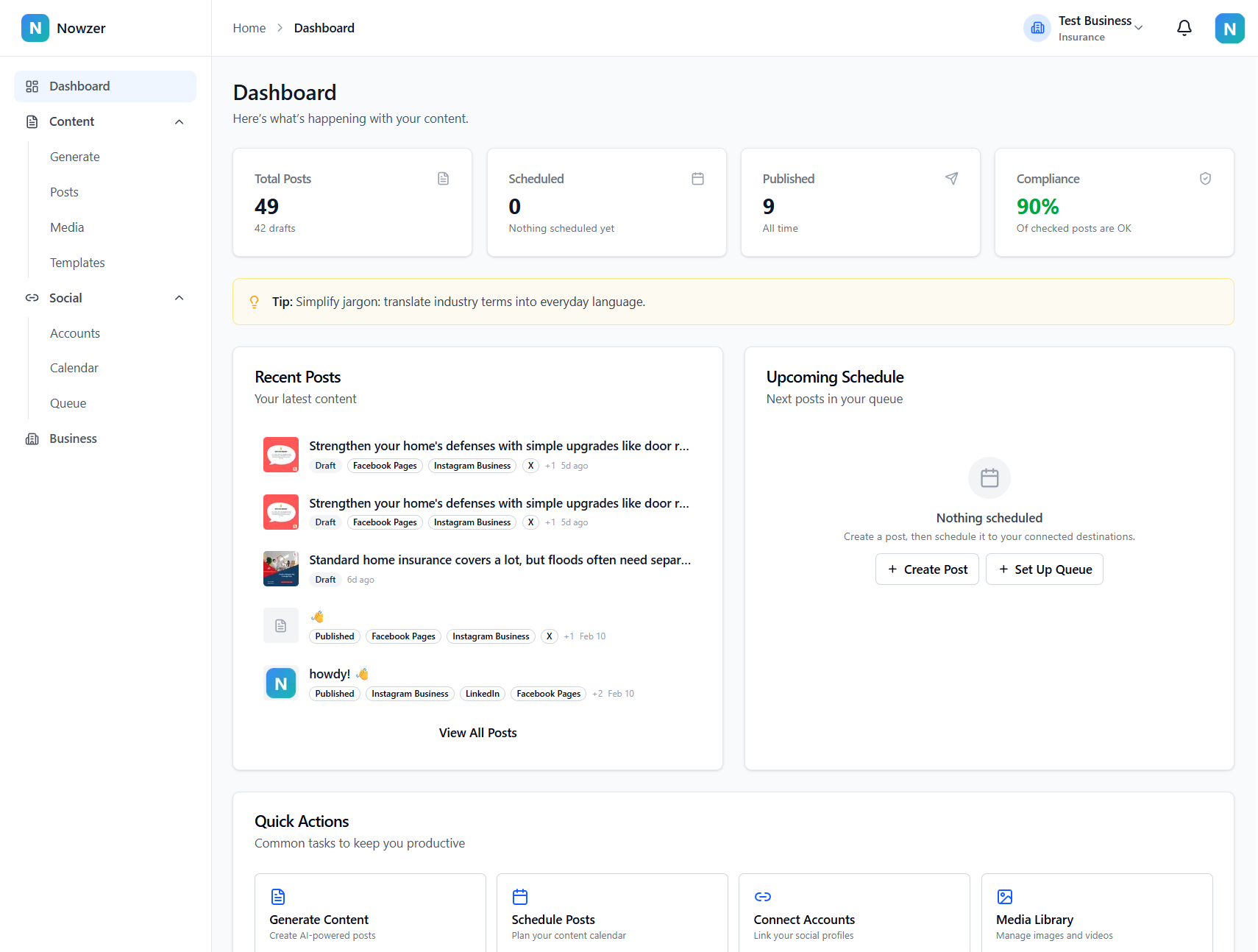
The top of the active dashboard shows four stats at a glance:
| Stat | What it shows | Links to |
|---|---|---|
| Total Posts | All posts you have created | Content Library |
| Scheduled | Posts waiting to be published | Queue |
| Published | Posts that have been successfully published | Content Library |
| Compliance | Posts pending compliance review (or compliance status if disabled) | Compliance Review Queue or Business Settings |
Compliance alerts
If you have compliance review enabled and there are posts waiting for review, a yellow banner appears below the stats showing the count. Click Review Now to go directly to the compliance review queue.
Recent posts and upcoming schedule
The lower section of the dashboard shows two cards side by side on larger screens. Recent Posts displays your most recently created content with thumbnails, status badges, and platform icons. Upcoming Schedule shows your next scheduled posts with the channel name, scheduled time, and status. Each card links to the full Content Library or Calendar for more detail.
Quick actions
The Quick Actions card provides shortcuts to the four most common tasks: Generate Content, Schedule Posts, Connect Accounts, and Media Library. These are the same pages you can reach from the sidebar navigation, offered here for convenience.
Related articles
Navigating Nowzer
An overview of the sidebar navigation, top bar, settings locations, and how to move between the main areas of the application.
Quickstart: Your first post in 15 minutes
A complete walkthrough from creating your account to publishing your first social media post. Follow these steps in order and you will be up and running in about 15 minutes.